G-TRAK Wall Mount Kit
$199.99 USD


G-TRAK Wall Mount Kit features
A kit that mounts the G-TRAK Retractable Screen or Net to wall studs instead of garage door tracks, so a basement or bonus room gets the same retractable setup. Top brackets, wall mount arms and bottom screen supports.
Any Room, Not Just Garages
Mounts the G-TRAK to a wall instead of garage door tracks.
Screen or Net
Integrates with the G-TRAK Retractable Screen and the Retractable Net.
Anchors to Wall Studs
Top brackets fasten to studs with the provided 1/4" x 2" lag bolts.
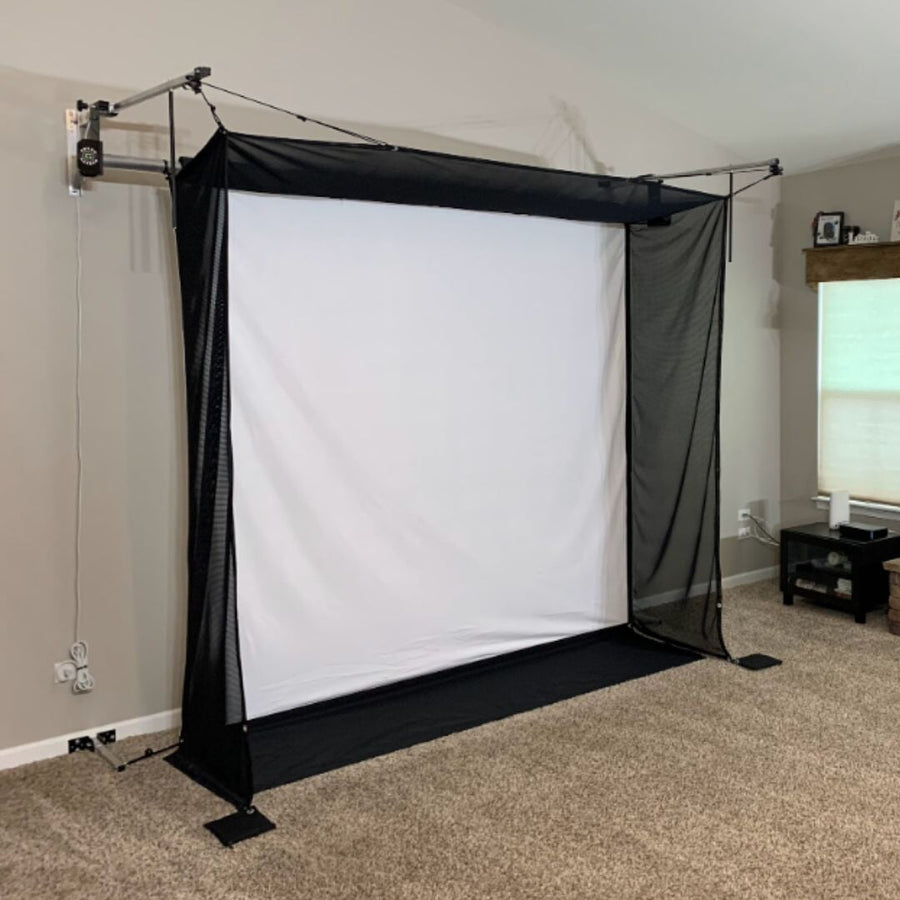
Wall Space by Width
Plan 1' more wall than the screen width: an 8' screen needs 9'+ of wall.
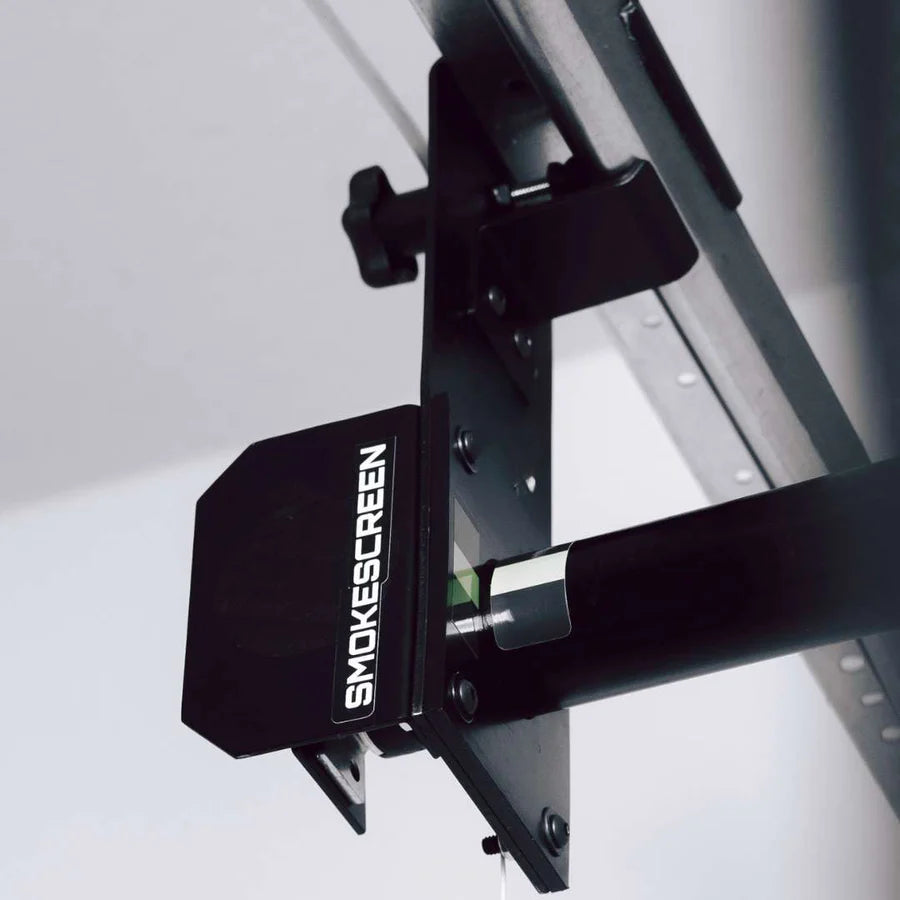
Top Brackets at 105"
The top of each top support bracket sits 105" from the floor.
Bungees Keep It Tight
Ball bungees through the lower D-rings hold the screen taut while you play.
Why Golfers trust The Indoor Golf Shop
Everything You Need To Bring Golf home
From industry-leading golf equipment to custom simulator solutions, we deliver quality, expertise, and support you can count on.
SIGPRO Quality
We build our own — MyGolfSpy's top-rated impact screen and more.
Solutions for Any Golfer
Won't fit your room? We'll build one that does.
Fast Shipping
Most orders ship free to the lower 48. Details
Best Technology Prices
We buy direct — and match any lower price.
Financing
Spread the cost and golf sooner — options at checkout. Details
30-Day Returns
Changed your mind? 30 days to return. Details
G-TRAK Wall Mount Kit
Looking to set up a retractable screen or net in a room rather than a garage? The G-TRAK Wall Mount Kit mounts your G-TRAK to a wall instead of garage door tracks. Whether you are using the G-TRAK Retractable Screen or the Retractable Net, the wall mounts integrate with the system, so a basement, gym or bonus room can have the same lower-it-to-play, raise-it-to-store setup as a garage.
Wall space you need
The drive tubes are telescopic and adjust to your space, and G-TRAK is designed to mount firmly to your wall studs. Our wall mounting guide lists the wall space needed for each screen width, with at least 6" of extra space on each side:
- 7' wide screen: 8'+ of wall space
- 8' wide screen: 9'+ of wall space
- 10' wide screen: 11'+ of wall space
- 12' wide screen: 13'+ of wall space
- 14' wide screen: 15'+ of wall space
Ensure the room you are setting up in has the proper support to mount the brackets and the retractable system.
How it installs
Locate the left and right wall studs for your screen width and mark them 105" from the floor; the top of each top support bracket sits at that mark. Anchor the top support brackets with the provided 1/4" x 2" lag bolts. Then install your G-TRAK following the garage directions, with two changes: the system mounts to the top support wall brackets instead of the garage door tracks, and the large male wall mount arms slide into the female slots of the top brackets in place of the border track brackets. Anchor the bottom screen support brackets low on the wall or baseboard, 6" outside the screen on each side, with at least two lag bolts per side; they are designed to catch the kickplate studs at the bottom of most walls. The small male arms click into place with a push-button pin, D-rings facing the screen, and two ball bungee cords loop through the D-rings and the bottom grommets of the screen to keep it tight while you play.
After you play
Unhook the top border mesh and the bottom ball bungees, remove the large top arms and the small bottom arms, and store them out of the way until next time. Then retract the G-TRAK with the remote as usual.
Where it fits
Use the kit for a room where there is no garage door track to hang from: a basement simulator, a home gym, a bonus room or a commercial space. Pair it with the screen and any of the G-TRAK targets, from the Golf Target to the Multisport Target Bundle.
Warranty, returns and support
G-TRAK products carry a standard 1-year warranty that starts after delivery; the customer is responsible for shipping fees on a warranty return. Our 30-day return policy also applies: the customer pays return shipping, and opened or used items are subject to a 15% restocking fee. G-TRAK accessories are fulfilled by The Indoor Golf Shop. For help, call 972-848-7491, 8am to 6pm Central, Monday to Friday, or visit support.shopindoorgolf.com.

What's included
- Top support wall mount brackets (left and right)
- Large male wall mount arms
- Bottom screen support brackets
- Small male arms with D-rings
- 1/4" x 2" lag bolts
- 2 ball bungee cords
G-TRAK Wall Mount Kit specs
Accessory
| Fits / compatible with | G-TRAK Retractable Screen (all sizes), G-TRAK Retractable Net |
| Material | Metal wall brackets and mount arms (as pictured) |
| Weight | 5 lb |
Identifiers
| Brand | G-TRAK |
| MPN | sku-47108164649247 |
| SKU | sku-47108164649247 |
| Usage environment | Indoors |
Reviews
G-TRAK Wall Mount Kit Reviews
Frequently asked questions
Does the Wall Mount Kit work with the G-TRAK Retractable Net?
How much wall space do I need?
What do the brackets attach to?
Is a garage door track needed?
How fast does it ship?
What is the warranty and return policy?
G-TRAK Wall Mount Kit Delivery & support
What happens after you order: putting it together, the paperwork, and how to reach us.
Vendor Support
Email: [email protected]
Hours: 8am - 6pm (CT) M-F
support.shopindoorgolf.com
Indoor Golf Shop Support Links
User manual
Warranty
G-TRAK standard 1-year warranty, starting after delivery; the customer pays shipping on a warranty return.
Helpful links
Protection plans
Covers manufacturer defects and accidental damage for 1 year
Full coverage for 3 years including parts and labor
Additional Protection Offered by The Indoor Golf Shop
Get peace of mind with additional coverage options from The Indoor Golf Shop, these solutions can be added to your product at the time of purchase for the best possible protection against damage or loss.
The links below are to file a claim or manage an existing plan.
Protects your order against loss, theft, or damage in transit. Add it at checkout; if a package is lost, stolen, or arrives damaged, file a claim with Route for a refund or replacement (generally within 30 days).
Extends coverage beyond the manufacturer's warranty and adds accidental-damage protection. Add a plan at checkout; manage your plan or file a claim anytime through your Mulberry account.
Learn More About The G-TRAK Wall Mount Kit
A G-TRAK for rooms without a garage door
The G-TRAK Retractable Screen and Net were designed to hang from garage door tracks, but not every practice space has one. The Wall Mount Kit lets you mount the G-TRAK to a wall instead, in its original patent design, so a basement simulator, a home gym or a bonus room gets the same system: lower the screen from the wireless remote to play, raise it when you are done. The kit integrates with both the Retractable Screen and the Retractable Net. Before you order, make sure the room has the proper support to mount the brackets and the retractable system: G-TRAK is designed to mount firmly to wall studs, and the lag bolts in the kit are made for that.
Brackets at 105 inches
Installation starts with the top support wall mount brackets. Find the left and right wall studs for your screen width and mark the left stud 105" from the floor, then use a laser level or a measurement from the floor or ceiling to mark the right one. The very top of each bracket sits at the mark. Small L-shaped tabs face the inside, the brackets stay perpendicular to the floor, and you anchor them with the provided 1/4" x 2" lag bolts, pre-drilling if needed. From there you follow the G-TRAK garage directions, mounting the system to the wall brackets instead of the door tracks and sliding the large male wall mount arms into the brackets' female slots with the border track plate on the outside.

Planning your wall space
The drive tubes are telescopic, so the system adjusts to your wall, but the screen needs room on each side. Our guide lists the wall space to plan for: 8'+ for a 7' wide screen, 9'+ for 8', 11'+ for 10', 13'+ for 12' and 15'+ for 14', with at least 6" of extra space on each side. At the bottom, the screen support brackets anchor 6" outside the screen on each side, low on the wall or baseboard, where they catch the kickplate studs of most walls. Two ball bungee cords then loop through the D-rings and the bottom grommets to keep the screen tight. After play, unhook the bungees and border mesh, remove the arms, and retract. Store the removed arms with the targets so the next setup is quick.