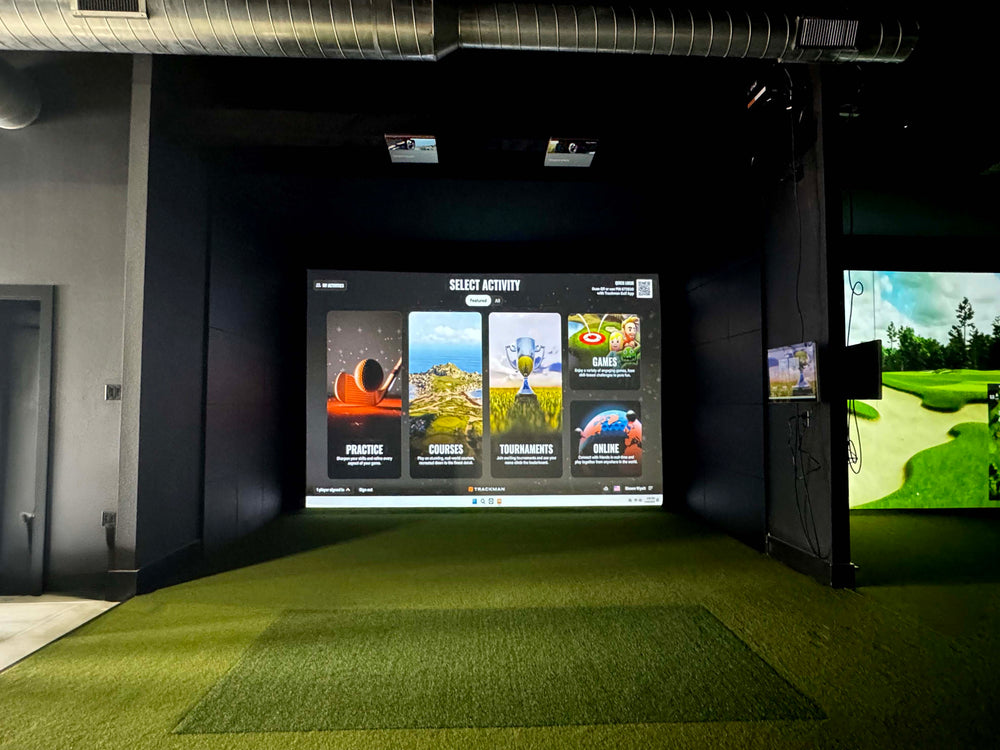
ProTee Promo: FREE High Speed Swing Cameras (x2)!
ProTee VX Launch Monitor
$6,500.00 USD


 Free shipping
on all orders!
 Easy no hassle
returns!
Details
- ProTee's Newest Launch Monitor
- Dual High Speed Camera System
- Measures Club & Ball Data
- Ceiling Mounted
- Multiple simulator software options
What's included
- ProTee VX Launch Monitor
- Ceiling Mount Bracket
- Charging & Ethernet Cables
- ProTee Labs Software
ProTee VX Launch Monitor features
The ProTee VX is a ceiling-mounted golf launch monitor for permanent indoor simulator setups. It uses two high-speed cameras to measure ball and club data without requiring special balls. It is ideal for golfers building a dedicated simulator room who want full club data with nothing on the floor.
Ceiling Mounted Design
This launch monitor is designed to be installed overhead for a permanent indoor golf simulator setup.
Large Hitting Zone
The 25 by 21-inch hitting zone accommodates both right and left-handed players.
Tracks Ball and Club Data
The system precisely tracks both ball and club data for detailed analysis.

AI-Powered Data
The launch monitor uses AI and machine learning to provide precise ball and club data and analysis.
Left and Right Handed Play
The VX system accommodates both right- and left-handed players seamlessly, without requiring recalibration or reconfiguration.
No Special Balls Required
You do not need marked or special golf balls to use this launch monitor.
Why Golfers trust The Indoor Golf Shop
Everything You Need To Bring Golf home
From industry-leading golf equipment to custom simulator solutions, we deliver quality, expertise, and support you can count on.
SIGPRO Quality
We build our own — MyGolfSpy's top-rated impact screen and more.
Solutions for Any Golfer
Won't fit your room? We'll build one that does.
Fast Shipping
Most orders ship free to the lower 48. Details
Best Technology Prices
We buy direct — and match any lower price.
Financing
Spread the cost and golf sooner — options at checkout. Details
30-Day Returns
Changed your mind? 30 days to return. Details
Unrivaled Indoor Performance
The ProTee VX Launch Monitor from Protee United is engineered for dedicated indoor golf simulator setups, providing a permanent overhead solution for comprehensive swing analysis. This advanced unit utilizes two high-speed cameras positioned above the hitting area, capturing detailed ball and club data on every shot. Unlike some other systems, the ProTee VX does not require special marked balls or club stickers, allowing for a more natural and uninterrupted practice experience. Its camera-based photometric tracking technology is specifically designed for the confines of a simulator room, ensuring precise measurements even at short distances. The system delivers nearly instant feedback, with all shot data and a club-at-impact video replay appearing on screen in under 0.3 seconds after each swing.
The ProTee VX offers a professional level of accuracy without the significant cost often associated with large commercial systems. Its fixed overhead position ensures consistent and stable measurements, accommodating both right- and left-handed players without any need for recalibration or moving the unit. This design also means there's nothing on the floor to interfere with your swing or setup. For those looking to build a DIY golf simulator or upgrade an existing one, the ProTee VX provides a robust and reliable foundation.
Dual High-Speed Camera System
The ProTee VX features dual high-speed cameras to track ball and club data while also recording the impact between the club and ball. With the VX, there is no need to use marked balls to track ball data; the dual high-speed cameras can easily read and track any golf ball being used. This advanced system optically measures all data points, ensuring high accuracy without relying on estimations. The dual high-speed cameras and AI-powered tracking capture complete ball and club data on every shot, without the need for special stickers on golf clubs or specific types of golf balls.
Seamless Integration and Broad Compatibility
The ProTee VX is designed for effortless integration into your golf simulator environment. It connects directly to popular simulation platforms like GSPro, offering access to a vast array of courses and online tournaments. Beyond GSPro, the unit also supports E6 Connect and Creative Golf 3D, though these may require a separately purchased connector for full functionality. A key advantage of the ProTee VX is that all primary functions are available immediately, with no hidden charges or mandatory subscriptions required to access your data or utilize third-party software. This commitment to transparency ensures that you have full control over your golf simulation experience without unexpected annual costs.
The included ProTee Labs software provides a comprehensive suite for practice, detailed data review, and impact video analysis. This allows golfers to delve deep into their swing mechanics and track progress over time. While The Golf Club 2019 was previously supported, it will no longer be as of spring 2025. The system's ability to integrate with various simulation software makes it a versatile choice for any golfer looking to enhance their indoor practice and play. Consider exploring our golf simulators collection to find compatible setups that maximize the ProTee VX's capabilities.
ProTee VX Software Inclusions
The ProTee VX comes equipped with a software user interface that displays ball, club, and flight data, along with video replays of club-at-impact and ball spin. The included ProTee Labs software offers a comprehensive suite for practice, detailed data review, and impact video analysis. This allows golfers to delve deep into their swing mechanics and track progress over time. A key benefit of the ProTee VX is that all core features are unlocked from day one—there are no hidden fees or mandatory subscriptions to access your data or use third-party software.
Robust PC Requirements for Optimal Performance
To fully leverage the capabilities of the ProTee VX Launch Monitor and ensure a smooth, high-fidelity simulation experience, your personal computer must meet specific requirements. The system operates on a 64-bit version of Windows 10 or 11. For processing power, an Intel i9-9xxx or an AMD Ryzen 9 processor is recommended. To handle the detailed graphics and real-time data processing, a minimum of 16 GB of RAM is advised. The graphics card is particularly important for rendering realistic golf environments; an Nvidia RTX 3080 or an AMD RX 6800XT is suggested to provide the best visual performance.
Additionally, you will need at least 30 GB of free disk space to accommodate the ProTee Labs software and any third-party simulation platforms you choose to install. Meeting these specifications will ensure that your system can process the advanced shot analysis and deliver data in under 0.3 seconds without any lag. For those considering a complete setup, exploring golf simulator enclosures and golf impact screens that complement these technical demands can enhance the overall experience.

What's included
- ProTee VX Launch Monitor
- Ceiling Mount Bracket
- Charging & Ethernet Cables
- ProTee Labs Software
- Calibration Board
ProTee VX Launch Monitor specs
Launch monitor
| Technology | Photometric |
| Data points measured | 23 |
| Ball data | Ball Speed, Launch Angle, Launch Direction, Carry Distance, Total Distance, Spin Axis, Back Spin, Side Spin, Height (apex), Descent Angle, Apex Time, Off Line, Air Time, Run, Total Spin |
| Club data | Club Speed, Smash Factor, Club Path, Angle of Attack, Face Angle, Face to Path, Dynamic Loft, Spin Loft, Impact Location (face), Lie Angle at Impact, Closure Rate |
| Hitting zone | 25 in x 21 in |
| Where it sits | Ceiling Mounted Above Golfer — 3'4" to 3'7" in front of the hitting area |
| Connects by | Ethernet |
| Power source | AC Power |
| Battery life | N/A (no battery) |
| Use | Indoor Only |
| Impact video replay | Yes |
| Marked balls needed | No |
| Club stickers needed | No |
| Works with | GSPRO, E6 Connect, TGC 2019, Creative Golf 3D |
| Runs on | Windows |
| Accuracy | Tour level accuracy |
| Left-handed | Yes automatic |
| Putting tracked | Yes |
| Sensors | Dual high-speed cameras with A.I. (overhead) |
| Shot delay (s) | 0.3 |
| Software included | ProTee Labs |
| Subscription required | No |
| Subscription cost | Free (no subscription) |
| Dimensions (W x H x D) | 7.9 x 6.7 x 32.7 in |
| Weight | 20.7 lb |
| Portable | No |
| Minimum room width | 10' 0" |
| Minimum room depth | 13' 1" |
| Minimum ceiling height | 9' 0" |
| Country of origin | Netherlands |
Identifiers
| Brand | Protee United |
| GTIN | 198715278552 |
Compare Launch Monitors
The ProTee VX Launch Monitor measures 20 data points, including a comprehensive set of ball and club data, and offers a 25" x 21" hitting zone. The TruGolf APOGEE measures 6 data points and has an 8" x 10" hitting zone. The Golfin IDRA II tracks 15 data points and features a 32" x 18" hitting zone. The Uneekor EYE XR measures 18 data points and is positioned 3.5 ft behind the tee, while the Uneekor EYE XO2 measures 23 data points and has a 21" x 28" hitting zone.

|
$6,500
|
Protee United
|
Photometric
|
Ceiling Mounted Above Golfer
|
3'4" to 3'7" in front of the hitting area
|
Indoor Only
|
Recommended room: 9 ft high x 13 ft wide x 16 ft deep
|
Ball Speed, Launch Angle, Launch Direction, Carry Distance, Total Distance, Spin Axis, Back Spin, Side Spin, Height (apex), Descent Angle, Apex Time, Off Line, Air Time, Run, Total Spin
|
Club Speed, Smash Factor, Club Path, Angle of Attack, Face Angle, Face to Path, Dynamic Loft, Spin Loft, Impact Location (face), Lie Angle at Impact, Closure Rate
|
Free (no subscription)
|
GSPRO, E6 Connect, TGC 2019, Creative Golf 3D
|
Windows
|
Yes
|
Yes automatic
|
AC Power
|
Ships in 1 - 3 Business Days!
|
|---|---|---|---|---|---|---|---|---|---|---|---|---|---|---|---|---|

|
$6,500
|
TruGolf
|
Photometric
|
Ceiling Mounted Above Golfer
|
Ceiling-mounted, positioned about 21-25 in ahead of the tee
|
Indoor Only
|
Recommended room: 9 ft high x 14 ft wide x 18 ft deep
|
Ball Speed, Back Spin, Side Spin, Launch Angle, Launch Direction
|
Face Angle, Club Path, Face to Path, Angle of Attack, Smash Factor, Dynamic Lie, Dynamic Loft
|
E6 ENJOY included; higher E6 tiers extra
|
E6 Golf, E6 Connect
|
Windows
|
Yes
|
Yes automatic
|
AC Power
|
Ships in 5 - 13 Business Days!
|
|
$5,995
|
Golfin
|
Photometric
|
Ceiling Mounted Above Golfer
|
99" to 120" Camera Height, Ball to Camera Position is based on ceiling height (ranges from 51" to 61")
|
Indoor Only
|
Recommended room: 9 ft high x 13 ft wide x 16 ft deep
|
Ball Speed, Back Spin, Side Spin, Spin Axis, Launch Angle, Descent Angle, Deviation, Carry Distance, Total Distance
|
Club Speed, Club Path, Face to Path, Smash Factor
|
No proprietary course software to buy into and no subscription required for basic use.
|
GSPRO, E6 Connect
|
Windows
|
Yes
|
Yes automatic
|
AC Power
|
Ships in 5 - 7 Business Days!
| |

|
$5,499
|
Uneekor
|
Photometric
|
Ceiling Mounted Above Golfer
|
Ceiling-mounted, positioned about 3.5 ft behind the tee
|
Indoor Only
|
Recommended room: 9 ft high x 13 ft wide x 16 ft deep
|
Ball Speed, Side Spin, Side Angle, Spin Axis, Height (apex), Total Distance
|
Club Speed, Smash Factor, Club Path
|
Player free; Pro $199/yr; Pro+ $299/yr; Champion $399/yr; Ultimate $599/yr; Ultimate+ $699/yr
|
GSPRO, E6 Golf, E6 Connect
|
Windows
|
Yes
|
Yes automatic
|
AC Power
|
Ships in 2 - 7 Business Days!
|

|
$7,999
|
Uneekor
|
Photometric
|
Ceiling Mounted Above Golfer
|
Ceiling-mounted, positioned about 3.5 ft ahead of the tee
|
Indoor Only
|
Recommended room: 9 ft high x 13 ft wide x 16 ft deep
|
Ball Speed, Back Spin, Side Spin, Spin Axis, Side Total Distance, Launch Angle, Side Angle, Carry Distance, Run, Total Distance, Distance to Apex, Flight Time, Ball Flight Type
|
Dynamic Loft, Club Speed, Smash Factor, Club Path, Face to Path, Angle of Attack, Face Angle, Lie Angle at Impact, Impact Offset (vertical), Impact Offset (horizontal)
|
Player free; Pro $199/yr; Pro+ $299/yr; Champion $399/yr; Ultimate $599/yr; Ultimate+ $699/yr
|
GSPRO, E6 Golf, E6 Connect
|
Windows
|
Yes
|
Yes automatic
|
AC Power
|
Ships in 2 - 7 Business Days!
|

No launch monitors match your search.
Reviews
ProTee VX Launch Monitor Reviews
- Reviews
- Questions
- Playing Golf
- golf sim
- breaks
- floor monitors
- upgrade
- improvement
- feedback
- system
- swing
 United States
Great system
Already seen great improvement in my swing with the feedback I get from the system. And it’s a lot more enjoyable playing golf with it.
The Indoor Golf Shop
Mr. Gibson, Thank you so much for your wonderful review! We are thrilled to hear that you had such a positive experience with the ProTeeVX! Your kind words truly mean a lot to us and motivate us to continue providing the best service possible. If there’s anything more we can do for you or any feedback you have, please don’t hesitate to reach out! Best regards, The Indoor Golf Shop Team
United StatesProtee VX
I love this overhead launch monitor. It's accurate and very simple to use. It's so much better than floor monitors. My golf sim is amazing with this upgrade. I have to force myself to take breaks to recover.
Frequently asked questions
How high do ceilings need to be for the ProTee VX?
What software comes with ProTee VX?
I need an activation key for the Protee VX software, can you please provide.?
What are the space requirements for the ProTee VX Launch Monitor?
How is the ProTee VX Launch Monitor set up and calibrated?
Does the ProTee VX Launch Monitor require special balls or club stickers?
ProTee VX Launch Monitor Delivery & support
What happens after you order: putting it together, the paperwork, and how to reach us.
Vendor Support
Warranty
ProTee covers its products for 1 year from the date of purchase against defects in material and workmanship, for the original purchaser from an authorized reseller. Outdoor use, golf-ball damage, screens, turf, mats and software are not covered.
Terms published by ProTee United.
User manual
Indoor Golf Shop Support Links
Helpful links
Protection plans
Covers manufacturer defects and accidental damage for 1 year
Full coverage for 3 years including parts and labor
Additional Protection Offered by The Indoor Golf Shop
Get peace of mind with additional coverage options from The Indoor Golf Shop, these solutions can be added to your product at the time of purchase for the best possible protection against damage or loss.
The links below are to file a claim or manage an existing plan.
Protects your order against loss, theft, or damage in transit. Add it at checkout; if a package is lost, stolen, or arrives damaged, file a claim with Route for a refund or replacement (generally within 30 days).
Extends coverage beyond the manufacturer's warranty and adds accidental-damage protection. Add a plan at checkout; manage your plan or file a claim anytime through your Mulberry account.
Learn More About The ProTee VX Launch Monitor

Optimized Space Requirements
When planning your indoor golf simulator, understanding the space requirements for the ProTee VX is crucial for an optimal setup. This ceiling-mounted unit is designed to be installed on a ceiling between 9 feet and 10 feet high. For a 10-foot ceiling, the unit should be mounted 3 feet 7 inches in front of the hitting area. If your ceiling height is 9 feet, the recommended mounting distance is 3 feet 4 inches in front of the hitting area. The ProTee VX itself features a generous hitting zone measuring 25 inches by 21 inches, which comfortably accommodates both right-handed and left-handed players without requiring any adjustments or recalibration of the unit.
For a truly immersive experience, a recommended simulator room size is 14 feet wide by 18 feet deep, with a minimum ceiling height of 9 feet 6 inches. This ensures ample space for swinging and allows for proper projection and screen placement. You can find more detailed information on how much space you need for a golf simulator to help plan your ideal setup. The precise placement of the ProTee VX, about 3.5 feet ahead of the tee, ensures accurate data capture from its dual high-speed cameras.

Advanced Data Capture and Analysis
The ProTee VX is equipped with dual high-speed cameras and artificial intelligence-powered tracking to deliver comprehensive ball and club data. This advanced system optically measures all data points, ensuring high accuracy without relying on estimations. Golfers receive precise measurements for ball speed, total spin, back spin, side spin, spin axis, launch angle, and launch direction. On the club side, the unit tracks clubhead velocity, swing path direction, club face angle, face-to-path relationship, angle of attack, dynamic loft, lie angle, and both vertical and horizontal impact points. In total, the ProTee VX captures 20 distinct data points, providing a deep dive into every aspect of your swing.
Beyond raw numbers, the system also provides flight data, including carry, total distance, offline deviation, apex height, apex time, air time, run, descent angle, and the full flight path. This wealth of information, combined with the impact video replay, offers invaluable insights for game improvement. The AI-powered club data is a standout feature, allowing for detailed analysis without the need for special club stickers. The ProTee VX also offers putting feedback, tracking ball roll and club impact, which is crucial for refining your short game. For those interested in optimizing their visual experience, consider pairing this with one of the best golf simulator projectors.

ProTee VX Launch Monitor
The VX features dual high speed cameras to track ball and club data while also recording the impact between the club and ball. With the VX there is no need to use marked balls to track ball data, the dual high speed cameras can easily read and track any golf ball being used.
Data Tracking:
- Ball Data Measured: Ball Speed, Total Spin, Spin Axis, Back Spin, Side Spin, Launch Direction, Launch Angle.
- Club Data Measured: Club Speed, Swing Path, Club Face Angle, Club Face to Path, Attack Angle, Dynamic Loft, Club Lie Angle, Impact Point Vertical & Horizontal.
- Flight Data: Flight Path, Apex Height, Apex Time, Total Distance, Carry Distance, Off Line, Air Time, Run, Descent Angle.

The ProTee VX comes equipped with a software user interface that displays ball, club, and flight data, along with video replays of club-at-impact and ball spin.
The ProTee VX offers robust software integration, making it easy to tailor your golf simulator experience to your preferences. Out of the box, the ProTee VX is compatible with leading third-party golf simulation software, including GSPro, E6 Connect, and Creative Golf 3D. This flexibility allows you to play on a wide variety of virtual courses, join online communities, and access advanced game modes—each platform offering unique features and gameplay options.
To connect the ProTee VX to E6 Connect or Creative Golf 3D, a third-party connector may be required and is typically purchased separately. GSPro integration is direct, allowing for a streamlined setup process. Please note that The Golf Club 2019 (TGC 2019), which was previously supported, has been discontinued as of spring 2025.
A key benefit of the ProTee VX is that all core features are unlocked from day one—there are no hidden fees or mandatory subscriptions to access your data or use third-party software. You simply install your preferred simulation platform, connect your ProTee VX, and start playing.
The included ProTee Labs software provides an intuitive interface for immediate shot feedback, detailed video replay, and comprehensive data analysis. With features like club-at-impact video replay and customizable practice panels, you can review every detail of your swing and ball flight, helping you fine-tune your game session by session.
Helpful Videos
Demos, reviews and how-tos from our team and the golf community.
PROTEE VX - BEST LAUNCH MONITOR UNDER $7000?
The Protee VX has really made a lot of heads turn with its full packed features and we think it merits showing you the beat features about it and our experience with it in this short video.
ProTee vs GC3: Overhead vs Portable Launch Monitor Comparison
ProTee vs Foresight GC3: which launch monitor is better for an indoor golf simulator?
ProTee VX At The PGA Show!
📷 There's some exciting things coming from ProTee this year as they released new data metrics for the VX and we got to learn all about it today at the PGA Show!
ProTee Software Release at 2026 PGA Show!
🎥 ProTee on the mic here at the 2026 PGA Show! @ProTeeUnited has some BIG software upgrades this year. The biggest shift? A major focus on the course editor.