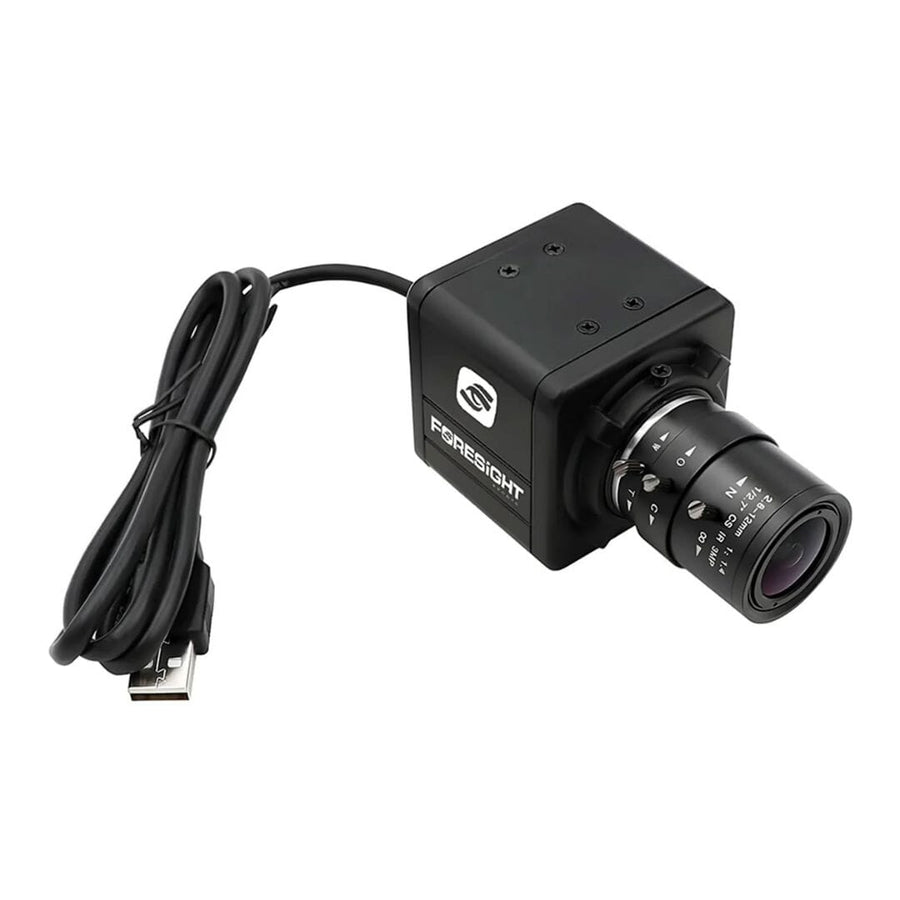
Foresight Sports USB Swing Camera
$350.00 USD


Details - Compatible with Foresight Sports Launch Monitors
- Global Shutter Technology: All pixels are exposed simultaneously, enabling 'freeze frame' capture of fast moving/fast changing events.
- Resolution: 1280 x 720 resolution
- FPS: A maximum of 120 frames per second
- Interface: High speed USB 2 interface, driverless, plug and play
- Lenses: 3 lens included in the kit: 2.1MM, 2.5MM and 2.8MM to 12MM
- Compatible Software: Swing Catalyst, FSX 2020, FSX Play.
What's included
- Swing Camera
- USB Cable
- 3 Lenses
Foresight Sports USB Swing Camera features
Foresight Sports' USB Swing Camera records swing video beside your shot data in FSX Play, FSX 2020 or Swing Catalyst. Global shutter, 1280 x 720 at up to 120 fps, plug-and-play USB and three lenses for 4' to 12'+ from the golfer. For GC3, GCQuad, QuadMAX, Falcon and Launch Pro users.
Global Shutter
Every pixel exposed at once for clean frames of a fast club.
1280 x 720 Video
HD resolution for reviewing posture, plane and impact.
Up to 120 FPS
Enough frames to step through the downswing one at a time.
Three Lenses
2.1, 2.5 and 2.8-12 mm lenses for 4' to 12'+ from the golfer.
Plug and Play USB
Driverless USB 2 connection to the simulator PC.
FSX Play and FSX 2020
Review swings in the analysis view after every shot.
Why Golfers trust The Indoor Golf Shop
Everything You Need To Bring Golf home
From industry-leading golf equipment to custom simulator solutions, we deliver quality, expertise, and support you can count on.
SIGPRO Quality
We build our own — MyGolfSpy's top-rated impact screen and more.
Solutions for Any Golfer
Won't fit your room? We'll build one that does.
Fast Shipping
Most orders ship free to the lower 48. Details
Best Technology Prices
We buy direct — and match any lower price.
Financing
Spread the cost and golf sooner — options at checkout. Details
30-Day Returns
Changed your mind? 30 days to return. Details
Foresight Sports USB Swing Camera: Swing Video Beside Every Shot
The Foresight Sports USB Swing Camera adds slow-motion swing video to a Foresight simulator. It plugs into the computer that runs your Foresight software, and after each shot you open the analysis view to watch the swing that produced the numbers. Seeing the motion next to the ball and club data makes it easier to connect a change in your swing with a change in the result.
Built to freeze a fast swing
The camera uses a global shutter: every pixel is exposed at the same moment, so a fast-moving club is captured as a clean frame instead of the smeared, bent shape a rolling shutter can produce. It records at 1280 x 720 resolution and up to 120 frames per second, which gives you enough frames through impact to step through the downswing one image at a time.
Three lenses for different rooms
Foresight includes three lenses so the camera can sit where your room allows. Foresight's recommended distances from the golfer are:
- 2.1 mm: 4 to 6 feet, for tight spaces behind or beside the golfer
- 2.5 mm: 6 to 10 feet
- 2.8 to 12 mm (variable): 10 to 12 feet or more, the most flexible option
A camera mount or stand is not included, so plan a tripod, wall or ceiling position for a face-on or down-the-line view.
Software it works with
Foresight lists three compatible programs: FSX Play, FSX 2020 and Swing Catalyst. In FSX Play, connect the camera and open the analysis window after a shot to review the swing from up to two angles. In FSX 2020 the camera is set up in the settings menu, swings appear in the analysis tab, and video and shot data can be reviewed later in the FSX Live cloud. Swing Catalyst adds drawing tools, slow-motion playback, video overlay and side-by-side comparison. Foresight notes that FSX Pro swing camera integration is not available at this time.
Which launch monitors it fits
Because the camera works through Foresight's software, it pairs with the launch monitors FSX Play supports, including the GC3, GCQuad, QuadMAX, Falcon and Bushnell Launch Pro, as well as the GC3S, GCHawk and GC2 with HMT. FSX Play runs on Windows only, so the camera connects to a Windows PC rather than a tablet or phone.
Specifications
- Shutter: global shutter
- Resolution: 1280 x 720
- Frame rate: up to 120 frames per second
- Interface: high-speed USB 2, driverless plug and play
- Lenses: 2.1 mm, 2.5 mm and 2.8 to 12 mm
- Software: FSX Play, FSX 2020, Swing Catalyst
- Part number: FSS00003707
Browse more golf simulator accessories or compare launch monitors.

What's included
- Foresight Sports USB Swing Camera
- USB cable
- Three lenses: 2.1 mm, 2.5 mm and 2.8 to 12 mm
- Not included: camera mount or stand
Foresight Sports USB Swing Camera specs
Accessory
| Fits / compatible with | Foresight Sports GC3, Foresight Sports GC3S, Foresight Sports GCQuad, Foresight Sports QuadMAX, Foresight Falcon, Foresight Sports GCHawk, Foresight Sports GC2 with HMT, Bushnell Launch Pro, Software: FSX Play, FSX 2020, Swing Catalyst (not FSX Pro) |
| Material | Stainless steel front, aluminum back |
| Dimensions (W x H x D) | 1.81 x 1.97 x 2.91 in |
| Weight | 11.3 lb |
Identifiers
| Brand | Foresight Sports |
| MPN | FSS00003707 |
| SKU | Foresight-Swing-Camera |
| Usage environment | Indoors |
Reviews
Foresight Sports USB Swing Camera Reviews
Frequently asked questions
Which launch monitors does the Foresight USB Swing Camera work with?
Do I need a Windows PC?
Which lens should I use?
Is a camera stand included?
How long does shipping take?
What is the warranty and return policy?
Foresight Sports USB Swing Camera Delivery & support
What happens after you order: putting it together, the paperwork, and how to reach us.
Vendor Support
Phone: 858-880-0179
Email: [email protected]
Hours: 6am - 6pm (PT) M-F
help.foresightsports.com
Indoor Golf Shop Support Links
User manual
Warranty
Foresight Sports covers its launch monitors for 2 years, parts and labor, against defects. Software, batteries and damage from misuse, modification or impacts are not covered.
Terms published by Foresight Sports.
Helpful links
Protection plans
Covers manufacturer defects and accidental damage for 1 year
Full coverage for 3 years including parts and labor
Additional Protection Offered by The Indoor Golf Shop
Get peace of mind with additional coverage options from The Indoor Golf Shop, these solutions can be added to your product at the time of purchase for the best possible protection against damage or loss.
The links below are to file a claim or manage an existing plan.
Protects your order against loss, theft, or damage in transit. Add it at checkout; if a package is lost, stolen, or arrives damaged, file a claim with Route for a refund or replacement (generally within 30 days).
Extends coverage beyond the manufacturer's warranty and adds accidental-damage protection. Add a plan at checkout; manage your plan or file a claim anytime through your Mulberry account.
Learn More About The Foresight Sports USB Swing Camera

Why a Global Shutter Matters
Most low-cost webcams use a rolling shutter, which reads the image line by line from top to bottom. A golf club moves so fast through impact that the shaft can move noticeably between the first and last line, so the club looks bent or smeared in the frame. The Foresight USB Swing Camera uses a global shutter instead: all pixels are exposed simultaneously, which Foresight describes as freeze-frame capture of fast-moving events. Combined with a maximum of 120 frames per second at 1280 x 720, that gives you clean frames to step through the takeaway, the top of the swing, the transition and the moment of impact. Faster frame rates need more light, so a bright, evenly lit hitting area helps the camera keep each frame sharp and free of motion blur. Because the camera is driverless and plug and play over USB 2, there is no separate capture card to install: plug it into the simulator PC and select it in the software.
Choosing a Lens and a Camera Spot
The kit includes three lenses so the camera can work in small rooms and large bays. Foresight recommends the 2.1 mm lens for a camera 4 to 6 feet from the golfer, the 2.5 mm lens for 6 to 10 feet, and the 2.8 to 12 mm variable lens for 10 to 12 feet or more. The shorter lenses are wider, which suits rooms with little space behind or to the side of the golfer; the variable lens lets the camera sit further away and still frame the full swing. Pick the spot first, then the lens: a face-on view shows weight shift and posture, and a down-the-line view shows swing plane and path. FSX Play can review a swing from up to two angles, so two cameras give you both views of the same shot. Keep the camera out of the swing path and the projector beam, and remember that a mount or stand is not included in the box.