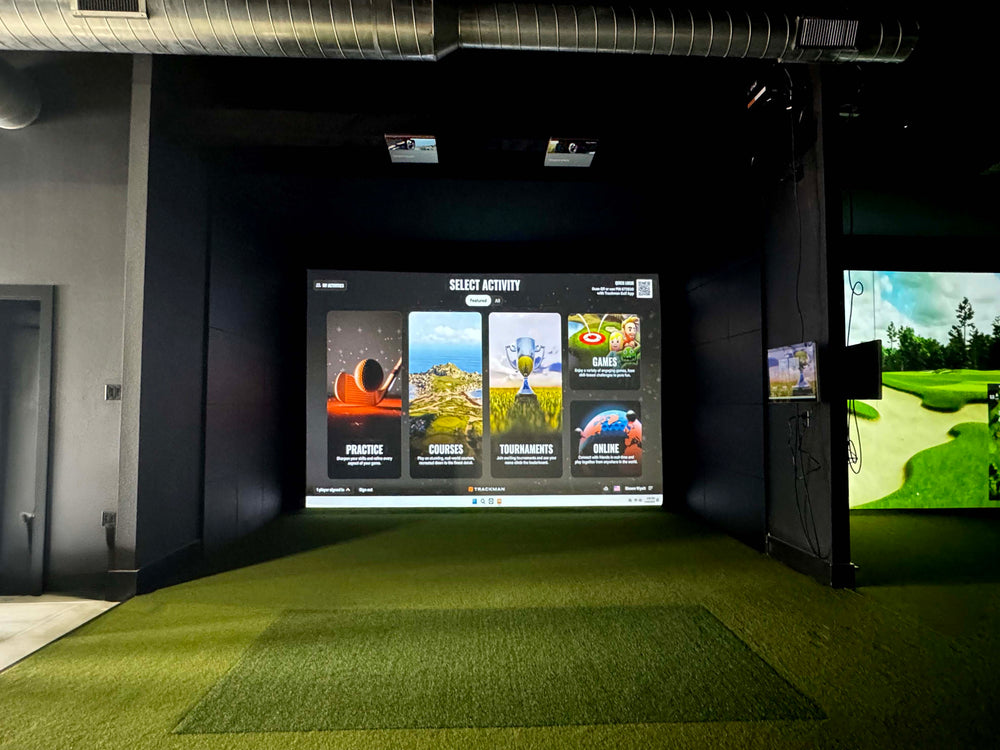
Make sure you can swing your club comfortably in your desired space, as you may need more than 9' high ceilings if your swing requires it. You can always place your setup in a space that is larger than the recommended space requirements.
*If you are looking for a Replacement Screen for your SIG10 please use the Overall Screen dimensions for your standalone screen order*
Assembly
The resources below will walk you through the assembly portion of your new frame and screen. Using the color coded pipe kit and connectors, set up your frame first then attach your black surround, impact screen, foam padding, and side barrier netting.
To download to full SIG10 Assembly Manual, Click Here.
The FlightScope Mevo GEN2 is the newest release from FlightScope, a launch monitor that is perfect for any golf simulatorsetup. The MEVO Gen 2 utilizes Doppler Radar tracking and synchronized image processing to read ball data. The Fusion Tracking technology of the MEVO Gen 2 allows it to track 15 full swing and chipping parameters and 3 putting parameters for a total of 18 metrics tracked!
The Indoor Golf Shop offers several Golf Simulator package styles to fit your needs, or visit our Golf Simulator Room Builder to design your own package!
SIG Golf Simulator Packages: Skip the hassle with these pre-configured setups featuring premium tech and top-tier SIG accessories.
DIY Golf Simulator Packages: Save money and customize your build with flexible packages designed for hands-on golfers.
Commercial Golf Simulator Packages: Luxury simulators built for durability and high-traffic use, these custom setups feature the best components for professional environments.
Golf Net Starter Packages: New to golf simulators? These starter kits include a net, basic mat, and your choice of launch monitor to get you swinging fast.
Custom Design & Build: The pinnacle of golf luxury. We'll work with you to design and build the simulator of your dreams directly into your home!
What's Included in the Flightscope Mevo Gen2 SIG10 Golf Simulator Package
FlightScope Mevo GEN2 Launch Monitor
Power Supply
USB-C to C cable
Carry Case
QuickStart Guide
100 Aluminum Stickers
FS Golf Practice App (iOS & PC)
FS Skill Challenge App (iOS & Android)
E6 Connect 8 Course Bundle (iOS & PC)
Golf Simulator Enclosure
Choice of Golf Hitting Mat
Landing Pad Turf
Your Choice of Projector & Accessories
Here's What You're Getting
MEVO GEN 2 Launch Monitor Features
The MEVO Gen2 Launch Monitor is the newest release from FlightScope! A new unit at a new price point, the FlightScope MEVO Gen 2 is a budget friendly launch monitor starting price below $2,000!
Setup is easy with the MEVO Gen2. Set up the unit 8' behind the ball and ensure you have at least 8' from the ball to the screen. The unit has a QR code that helps with mobile device setup!
Features:
Doppler Radar Tracking with Fusion Tracking technology from FlightScope
Tracks 18 Ball Data metrics (marked balls or RPT balls help the accuracy)
Includes 8 Iconic Golf Courses
Integrates with 3rd party software (E6 Connect, GSPRO, Creative Golf, Awesome Golf)
FlightScope Software Included (iOS, Android, PC)
6 Hour Battery Life
MEVO GEN2 Launch Monitor Metrics
The MEVO Gen2 currently tracks ball & minimal club data. Face impact location upgrades are now available!
Ball Data (Full Swing & Chipping): Carry Distance, Roll Distance, Total Distance, Ball Speed, Club Speed, Smash Factor, Vertical Launch Angle, Horizontal Launch Angle, Spin Axis, Apex Height, Flight Time, Lateral Landing, Angle of Attack, Shot Type.
Ball Data (Putting): Launch Speed, Total Distance, Ball Direction
Pro Package Data: This add-on for your Mevo+ or Mevo Gen2 adds essential data parameters like club path, face angle, swing plane, low point and more.
Face Impact Location Data: Improve your ball striking and hit the sweet spot more consistently with Face Impact Location. This add-on for your Mevo Gen2 or Mevo+ provides powerful heat maps and precise lateral/vertical impact data to help you visualize your strike patterns, whether you're practicing indoors or out.
FlightScope FS Golf App + Swing Video Compatibility
In order to view your GEN2 tracking data you will need to install the FS Golf app to your mobile device, tablet, or PC. The FS Golf App not only shows your launch monitor metrics but it also allows for swing video with data overlay. The app also has the ability to show shot tracing of your ball flight
e6 Connect Simulation Bundle Included
Included with your MEVO Gen2 is the E6 Connect Simulation bundle. This golf simulator software bundle is a lifetime ownership redemption! Play 8 World Renowned Golf Courses available on iOS and PC!
Kiawah Ocean Course: SC, USA
Torrey Pines Golf Course: CA, USA
Sea Island Seaside Course: GA, USA
Latrobe Country Club: PA, USA
Pelican Hill Golf Club: CA, USA
Chateau Whistler Golf Club: BC, Canada
Valderrama Golf Club: Cádiz, Spain
Kapalua Golf Club – Plantation Course: HI, USA
SIG10 Golf Simulator Enclosure
The SIG10 screen and enclosure pairs beautifully with your launch monitor. Built tough, the SIG10 screen can withstand the hardest of golf shots time after time. In fact, the team at MyGolfSpy voted it the Best Hitting Screen in their Most Wanted series.
Features:
Image Fills Up Entire Screen in HD
Premium, Handcrafted, Made in the USA
Powder Coated Aluminum Frame
Tight Knit Polyester Impact Screen
Protective Foam Padding Around The Screen
Frame Dimensions: 8'4"H x 10'10"W x 5' D
Golf Simulator Projector
We want you to have the flexibility to choose the projector that’s right for you. Our bundles always include an excellent deal on a "bundled" golf simulator projector by default, or you can easily upgrade to a different model—or remove it entirely if you already have your own. We've made it simple to customize your setup by offering the projector as a separate option, so you can swap, upgrade, or skip it altogether. Is space a consideration when choosing your projector? Check out our screen size & projector distance calculator to help model your space.
Projector Accessory Bundle
If you choose one of our projectors, we’ve made it easy to complete your setup with a projector accessory bundle—at no extra cost. Just add your preferred option, and we’ll include a 25' HDMI cable along with your choice of a ceiling mount or floor mount projector enclosure, free of charge.
Landing Pad Turf
Our landing pad is made specifically for the golf simulator and enclosure you choose. It fills in the area between the screen and the hitting mat making it aesthetically pleasing and protects your floor from golf ball strikes.
Choice of Golf Mat
Fairway Series 5' x 5' Golf Mat
Our Fairway Series mat is 5' x 5', roughly one inch thick and can hold a real tee. Ideal for those seeking realistic feel.
SIGPRO Softy 4' x 7' Golf Mat
The SIGPRO 4' x 7' is easy on the joints, and has enough space to set the a floor mounted launch monitor on the mat so it is level with the ball.
SIGPRO Softy 4' x 10' Golf Mat
If you have both right handed and left handed golfers, the 4' x 10' double sided golf mat is ideal with a center hitting strip.
Fairway Series 5' x 5' Golf Mat
Our Fairway Series mat is 5' x 5', roughly one inch thick and can hold a real tee. Ideal for those seeking realistic feel.
SIGPRO Softy 4' x 7' Golf Mat
The SIGPRO 4' x 7' is easy on the joints, and has enough space to set the a floor mounted launch monitor on the mat so it is level with the ball.
SIGPRO Softy 4' x 10' Golf Mat
If you have both right handed and left handed golfers, the 4' x 10' double sided golf mat is ideal with a center hitting strip.
SIG10 Golf Simulator Flooring
The Indoor Golf Shop's simulator flooring is a great option for those seeking the clean, professional look of a custom install - with the convenience of a done for you, easy to assemble kit.
It combines the best of two worlds: an integrated hitting strip embedded into the floor for full swing shots, surrounded by a putting green with four cups for dialing in your short game.
Not only does this look great, but it also conserves space by reducing the footprint of the hitting surface and maximizing the putting and chipping surface.
That's the beauty of SIGPRO's golf simulator flooring.
ARTICLES & BLOGS
How to Structure an Effective Practice Session ...
How to Structure an Effecti...
How to Structure an Effective Golf Practice Session Using a Launch Monitor When structuring a practice session, the goal is...
How to Structure an Effective Golf Practice Session Using a...
Introduction In the ever-evolving landscape of sports and entertainment, starting a golf simulator business represents a unique and promising venture. With...
Introduction In the ever-evolving landscape of sports and entertainment, starting...